Did you know that over 60% of students have faced penalties for not meeting essay word count requirements? Submitting an essay that's too long or too short can significantly impact your grade. Fortunately, knowing how to check word count in an essay before submission is a straightforward process.
Key Takeaways
Word count is a crucial academic requirement that tests conciseness and adherence to instructions.
Microsoft Word, Google Docs, Apple Pages, and various online tools offer easy ways to check word count.
Always clarify with your instructor whether citations, bibliographies, footnotes, and appendices count towards the total word count.
If under the word count, expand on existing points with more evidence and analysis.
If over the word count, trim redundancies, simplify language, and focus on essential arguments.
Periodically checking the word count during the writing process prevents last-minute panic.
This guide will equip you with the knowledge and tools to ensure your hard work perfectly aligns with the specified length.
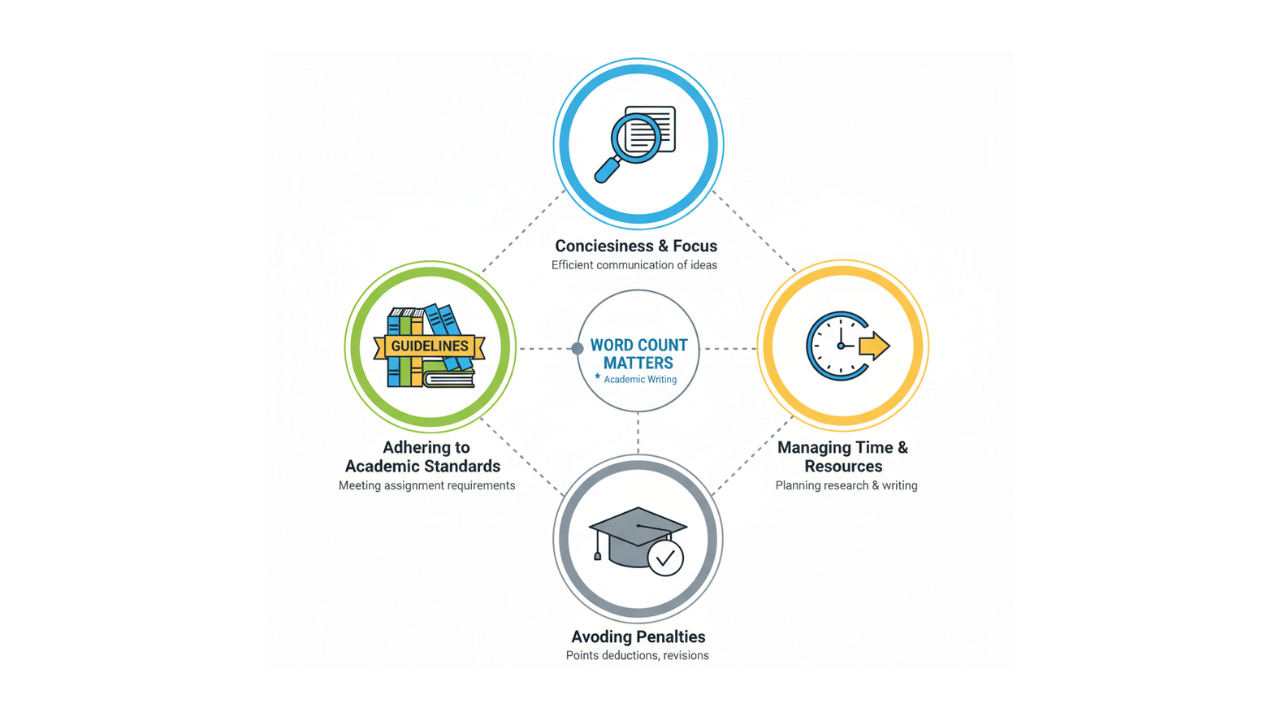
Why Word Count Matters in Academic Writing
Academic essays aren't just about conveying information; they're also about demonstrating your ability to be concise and comprehensive within defined parameters. A specific word count isn't arbitrary; it's a tool used by educators to assess various skills.
Demonstrating Concise and Focus
When an instructor assigns a word count, they're often testing your ability to stay focused on the topic. A lower word count encourages you to distill your arguments to their core, eliminating unnecessary jargon and repetitive points. Conversely, a higher word count allows for deeper exploration, more detailed evidence, and a more nuanced discussion. Understanding the target word count helps you tailor your writing to these specific objectives.
Adhering to Academic Standards
Universities and colleges have strict guidelines for academic submissions. Deviating from the word count can be seen as a failure to follow instructions, which can lead to deductions. For instance, a 2000-word essay that's only 1500 words might suggest insufficient research or underdeveloped arguments. Conversely, a 1000-word essay that stretches to 1500 words might indicate a lack of clarity or an inability to prioritize key information.
Managing Time and Resources
Word counts also serve as a practical guide for both students and instructors. For students, it helps in planning their writing process. Knowing the expected length allows you to estimate the research, writing, and revision time needed. For instructors, it provides a manageable workload for grading. A study by the University of Cambridge found that adhering to word limits can improve the efficiency of the feedback process for educators.

Essential Tools for Checking Word Count
Fortunately, you don't need to manually count every word. Modern technology offers several easy ways to check your essay's word count. The most common and accessible tools are built directly into your word processing software.
Microsoft Word: A Familiar Friend
Microsoft Word is arguably the most widely used word processor, and it makes checking word count incredibly simple.
The Status Bar Method
Look at the very bottom of your Word window. You'll see a status bar. On the left side of this bar, you should see the word count displayed. If you don't see it, right-click on the status bar and ensure 'Word Count' is checked.
The Review Tab
For more detailed statistics, navigate to the 'Review' tab at the top of the Word interface. Click on 'Word Count.' This will open a pop-up window showing not only the total word count but also character counts, paragraph counts, and line counts. This is a treasure trove of information for any writer.
Google Docs: The Cloud-Based Solution
Google Docs is a popular free alternative, especially for collaborative projects. It also provides an easy way to check your word count.
Accessing Word Count in Google Docs
While editing your document, go to the 'Tools' menu at the top. Select 'Word count'. A small box will pop up displaying the total word count. You can also choose to display the word count as you type by checking the box labeled 'Display word count while typing.' This is incredibly useful for keeping track as you write.
Apple Pages: For Mac Users
If you're using Apple Pages on a Mac, checking the word count is just as intuitive.
Finding Word Count in Pages
Open your document in Pages. Go to the 'Edit' menu, then select 'Statistics'. A window will appear showing the word count, character count, and other useful metrics. Similar to Google Docs, you can enable a 'Show word count' option for real-time tracking.
Online Word Counter Tools: Versatile Options
Beyond word processors, numerous free online tools can help you check word counts. These are excellent if you're using a platform that doesn't have a built-in counter or if you want to quickly check a piece of text copied from elsewhere.
Popular Online Tools
Websites like wordcounterhub.com offer simple interfaces. You typically paste your text into a box, and the tool instantly provides the word count, along with other statistics like character count and readability scores. We highly recommend exploring the features for comprehensive analysis.
Tips for Meeting Your Essay Word Count Requirements
Knowing how to check your word count is only half the battle. The real challenge often lies in adjusting your essay to meet the target. Here are some effective strategies:
If You're Under the Word Count:
Expand on existing points: Don't introduce entirely new arguments, but delve deeper into the ones you already have. Provide more evidence, examples, or explanations. For instance, if you mentioned a historical event, add a sentence or two about its immediate consequences.
Elaborate on your analysis: Instead of just stating a point, explain why it's significant. How does this piece of evidence support your thesis? What are the implications of your findings?
Add relevant definitions or background: If a term or concept is crucial to your argument, briefly define it or provide necessary context. Ensure this is directly related to your essay's focus.
Strengthen your introduction and conclusion: These sections are often good places to add a bit more detail. Ensure your introduction clearly outlines your thesis and roadmap, and your conclusion effectively summarizes and offers final thoughts.
Incorporate more scholarly sources: If appropriate, find additional academic sources that support your arguments and integrate them smoothly into your text. Remember to cite them properly.
If You're Over the Word Count:
Be ruthless with redundancy: Identify and remove any repetitive phrases, sentences, or ideas. Ask yourself: "Have I already said this?" If so, cut it.
Trim unnecessary words and phrases: Look for wordy constructions like "because" (replace with "because") or "to" (replace with "to"). Many online tools can help identify these.
Condense your sentences: Combine short, choppy sentences into longer, more complex ones where appropriate. Ensure clarity is maintained.
Focus on the most critical arguments: Evaluate if every point you've made is essential to your thesis. Remove tangents or less relevant details. Your essay should be a laser-focused argument.
Strengthen your topic sentences: Ensure each paragraph's main point is clearly stated at the beginning. This helps readers follow your logic and can sometimes eliminate the need for lengthy explanations.
Review your transitions: Sometimes, overly long transitional phrases can add unnecessary words. Make them concise and effective.
Understanding Different Word Count Metrics
When checking your word count, you might notice different metrics. It's important to understand what they mean:
Word Count vs. Character Count
Word Count: This is the most common metric, simply counting the number of words in your text. Most academic assignments specify a word count.
Character Count: This counts every single character, including spaces and punctuation. This metric is more common for things like social media posts or SMS messages, but is rarely used for essays.
Including or Excluding Citations and Bibliography
This is a crucial point often overlooked. Always clarify with your instructor whether citations, footnotes, endnotes, and the bibliography/works cited page count towards the total word count.
Common Practice: Typically, these elements are excluded from the main body's word count. However, always verify.
Check Your Style Guide: If you're using a specific citation style (like APA, MLA, or Chicago), consult its guidelines. For example, the MLA Handbook generally advises that the Works Cited list is not included in the word count of the essay itself.
Counting Footnotes and Endnotes
Footnotes/Endnotes: These often contain supplementary information or citations. Whether they count towards the word count depends entirely on your instructor's specific instructions. If they contain substantive arguments, they might be included. If they are purely bibliographic, they might be excluded.
Counting Titles and Headings
Titles and Headings: Generally, titles and headings are not included in the word count. They are structural elements, not part of the main textual argument.
Advanced Techniques for Word Count Management
Beyond the basic tools, several advanced strategies can help you manage your essay's length effectively, especially for longer or more complex assignments.
Utilizing the 'Track Changes' Feature
When revising, especially if you're collaborating or want to see how much you've added or removed, the 'Track Changes' feature (available in Word and Google Docs) is invaluable.
How it Works: This feature highlights all additions and deletions. You can then see a running word count of the changes made, which is incredibly useful for iterative editing and ensuring you're not drastically altering the length without realizing it.
Benefits: It allows you to revert changes if you over-edit and provides a clear history of your revisions, which can be helpful if you need to justify your word count adjustments.
Using Readability Statistics
Many word processors, like Microsoft Word, offer readability statistics. While not directly a word count tool, these statistics (like Flesch-Kincaid Grade Level) can indirectly help you manage length.
Connection to Concise: Text that is overly long often becomes less readable. By aiming for a good readability score, you naturally tend to use more concise language, which can help you stay within word limits. A higher grade level score often correlates with longer, more complex sentences and vocabulary, which can inflate word count unnecessarily.
Accessing Statistics: In Word, you can find this under Review > Spelling & Grammar > Readability Statistics. Ensure 'Show readability statistics' is checked in the options.
The Power of Outlining
A well-structured outline is your best defense against word count issues before you even start writing.
Pre-writing Planning: Before you begin drafting, create a detailed outline. Allocate a rough word count to each section or paragraph based on the total requirement. For example, in a 2000-word essay, you might allocate 200 words for the introduction, 300 for each of your five main body paragraphs, and 200 for the conclusion. This provides a roadmap.
Guidance During Writing: As you write, you can refer back to your outline and its allocated word counts. If a section is significantly exceeding its target, you know to be more concise. If another is falling short, you know where you have room to expand.
Common Pitfalls and How to Avoid Them
Even with the best tools, writers can fall into common traps regarding word count. Being aware of these can save you a lot of trouble.
Pitfall 1: Ignoring the Word Count Until the Last Minute
The Problem: Many students write their entire essay without considering the word count, only to find they are significantly over or under when they finally check. This leads to rushed editing and often compromises the quality of the work.
The Solution: Start checking your word count early and periodically throughout the writing process. Use your outline to guide you, and don't be afraid to adjust your scope as you go.
Pitfall 2: Misinterpreting "Up to" or "Around" Word Counts
The Problem: Phrases like "up to 1000 words" or "around 500 words" can be confusing.
The Solution:
"Up to X words": This means your essay should be no more than X words. You can be significantly under, but exceeding the limit is a clear violation. Aim to be close to the limit without going over. "Around X words": This implies some flexibility. For a 500-word target, 475-525 words are usually acceptable. However, it's always best to err on the side of caution and stay within a 10% margin (e.g., 450-550 words for a 500-word target). When in doubt, ask your instructor for clarification.
Pitfall 3: Forgetting About References and Appendices
The Problem: As mentioned earlier, not clarifying whether references, appendices, or bibliographies are included in the word count can lead to unexpected issues.
The Solution: Always confirm this with your instructor before you start writing or at the beginning of your revision process. This ensures you allocate your main writing effort effectively.
Pitfall 4: Over-Reliance on Filler Content
The Problem: Trying to reach a word count by adding irrelevant information, jargon, or overly complex sentences can make your essay weak and unfocused.
The Solution: Focus on quality over quantity. If you need to add words, do so by deepening your analysis, adding relevant evidence, or clarifying your arguments. Never sacrifice clarity and relevance for the sake of hitting a number. A strong, concise argument is always better than a long, rambling one.
Conclusion: Mastering Word Count for Academic Success
Effectively managing your essay's word count is a critical skill in academic writing. It demonstrates your ability to follow instructions, structure your thoughts logically, and convey ideas with precision. By understanding how to check word count in an essay before submission using readily available tools and by employing strategic writing and editing techniques, you can confidently meet assignment requirements.
Remember always to clarify any ambiguities regarding what counts towards the word limit. A few minutes spent checking and adjusting can save you from potential grade deductions and ensure your essay makes the most impactful statement possible. Happy writing!
Frequently Asked Questions (FAQs)
How do I check the word count in Microsoft Word?
A1: In Microsoft Word, the word count is usually displayed on the status bar at the bottom of the window. You can also find a more detailed breakdown under the 'Review' tab by clicking 'Word Count'.
Q2: Does the bibliography count towards the essay word count?
Typically, the bibliography or works cited page does not count towards the main essay word count. However, you should always confirm this with your instructor, as requirements can vary.
Q3: What should I do if my essay is significantly under the required word count?
To increase your word count, you can elaborate on your existing points by adding more supporting evidence, examples, or in-depth analysis. Ensure any additions are relevant and strengthen your argument.
Q4: How can I reduce my essay's word count if it's too long?
To shorten your essay, remove repetitive phrases, trim unnecessary words, condense sentences, and focus only on the most critical arguments. Ensure every sentence serves a clear purpose.
Q5: Are online word counter tools reliable for academic essays?
Yes, most reputable online word counter tools are reliable for providing an accurate word count. Websites like these offer accurate counts and additional helpful statistics.
Q6: What does "up to 1000 words" mean for an essay submission?
"Up to 1000 words" means your essay should not exceed 1000 words. You can submit an essay with fewer words, but going over the limit is usually not permitted.
Sources:
University of Cambridge. (n.d.). Academic Writing Resources. (Note: Specific study details would require a direct citation from their publications if available.)
MLA Handbook. (9th ed.). Modern Language Association of America. (General guidance on formatting and manuscript preparation).
Purdue Online Writing Lab (OWL). (n.d.). Essay Structure.